Async Code in Node.js: Callbacks and Promises
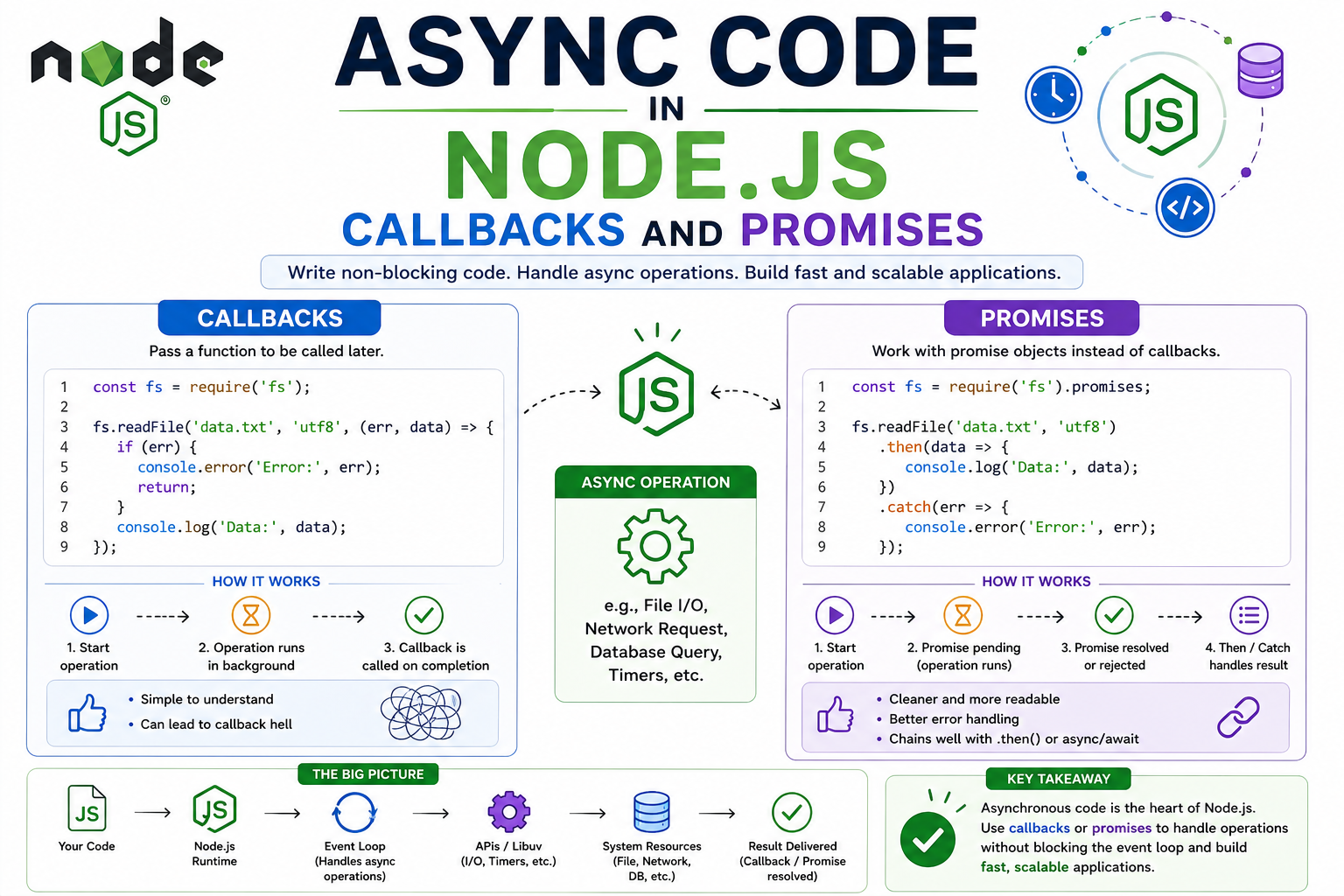
When I first started using Node.js, one thing confused me almost immediately.
Why does so much code seem to happen… later?
I’d read something like:
fs.readFile("data.txt", (err,data)=>{

 console.log(data);

});

console.log("Done");
And I expected:
Read file.
Show data.
Then print:
Done.
But what actually happened surprised me.
Sometimes:
Done
showed before file data.
And I remember thinking:
How is that possible?
Didn’t I write file reading first?
That was my first real encounter with asynchronous code in Node.
And honestly…
it felt weird until it clicked.
Why Async Code Exists in Node.js
This made much more sense when I stopped looking at syntax…
and started thinking about waiting.
Some operations take time.
Reading a file.
Fetching data.
Database queries.
Network requests.
Those things are not instant.
They may take a moment.
Question is:
Should Node sit there doing nothing while waiting?
That would be wasteful.
Async code exists so Node can keep moving.
That idea made everything easier to understand.
File Reading Example Made It Click
Suppose:
fs.readFile(
"notes.txt",
(err,data)=>{

 console.log(data);

}
);

console.log(
"Other code runs"
);
Node can continue doing other work while file is being read.
That’s the idea.
And once I understood that…
async stopped feeling random.
I Started Thinking Of It Like This
File reading starts.
Node does not freeze.
It keeps moving.
When file is ready…
run callback.
That’s the flow.
Very simple.
Callback-Based Async Execution
The first async style I learned was callbacks.
Which basically means:
Pass a function…
to run later.
That “run later” part is the key.
Example:
setTimeout(

function(){

 console.log(
  "Runs later"
 );

},

2000

);
That function is a callback.
It gets called later.
That’s all.
Callback Execution Chain
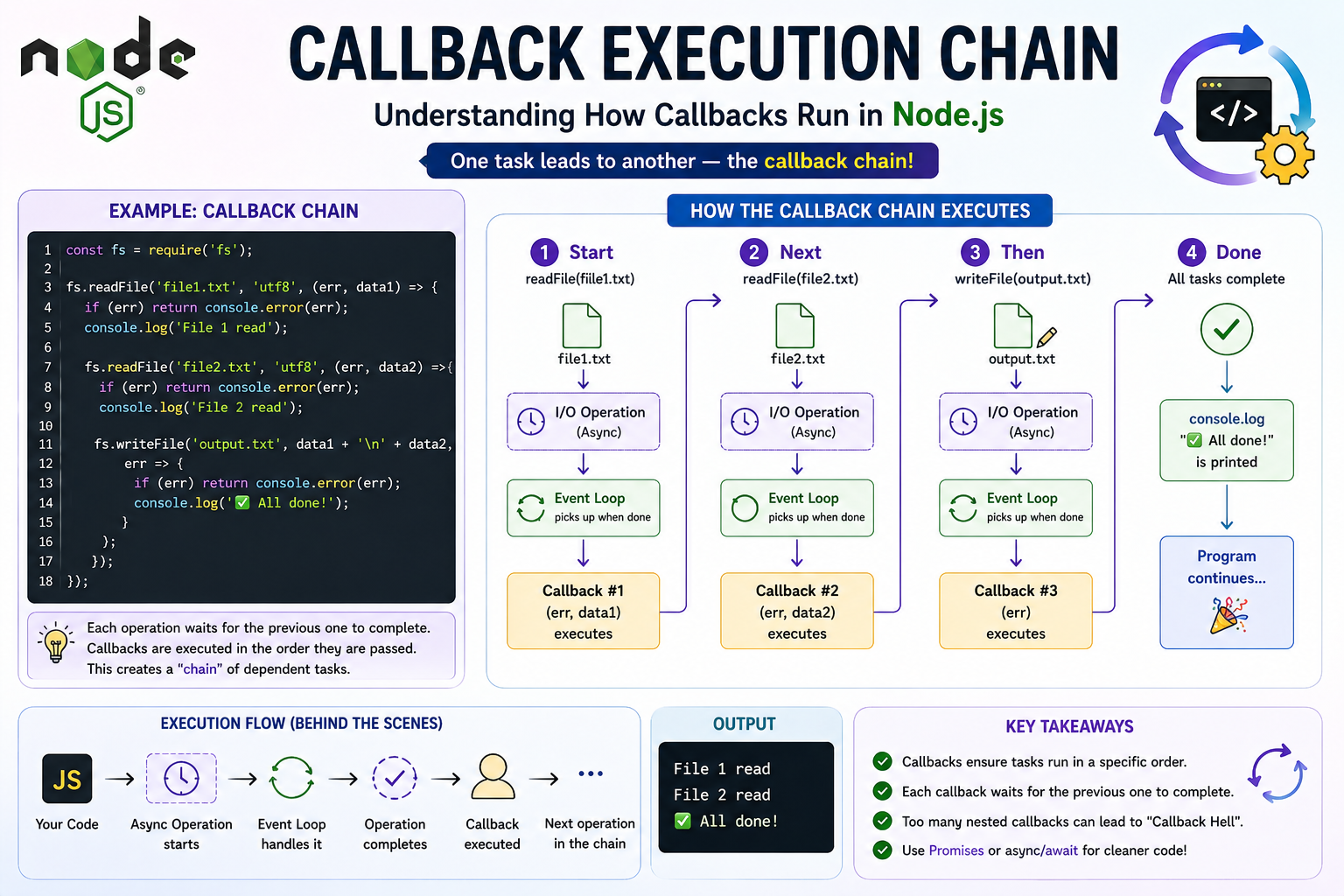
File Read Callback Example
Classic Node style:
const fs = require("fs");

fs.readFile(

"data.txt",

function(err,data){

 if(err){

  console.log(err);

  return;

 }

 console.log(
  data.toString()
 );

}

);
This looked messy to me initially.
But it’s really:
Start file read.
When finished…
run callback.
Then I Hit Nested Callbacks
And this is where things got ugly.
Something like:
getUser(function(user){

 getOrders(

 user.id,

 function(orders){

   getDetails(

    orders[0].id,

    function(details){

      console.log(details);

    }

   );

 }

);

});
And I remember looking at this and thinking…
why is my code drifting to the right?
Everything gets nested.
And harder to read.
This is where I first heard:
Callback hell.
And honestly…
fair name 😄
What Made It Hard
It wasn’t that callbacks were wrong.
It was readability.
Too much nesting.
Too much indentation.
Too much mental jumping.
That was the problem.
Promise-Based Async Handling
Then I learned promises.
And it felt much cleaner.
Same kind of flow:
getUser()

.then(user=>{

 return getOrders(
  user.id
 );

})

.then(orders=>{

 return getDetails(
  orders[0].id
 );

})

.then(details=>{

 console.log(details);

})

.catch(error=>{

 console.log(error);

});
Still async.
But much flatter.
That was a big improvement.
Promise Lifecycle Flow
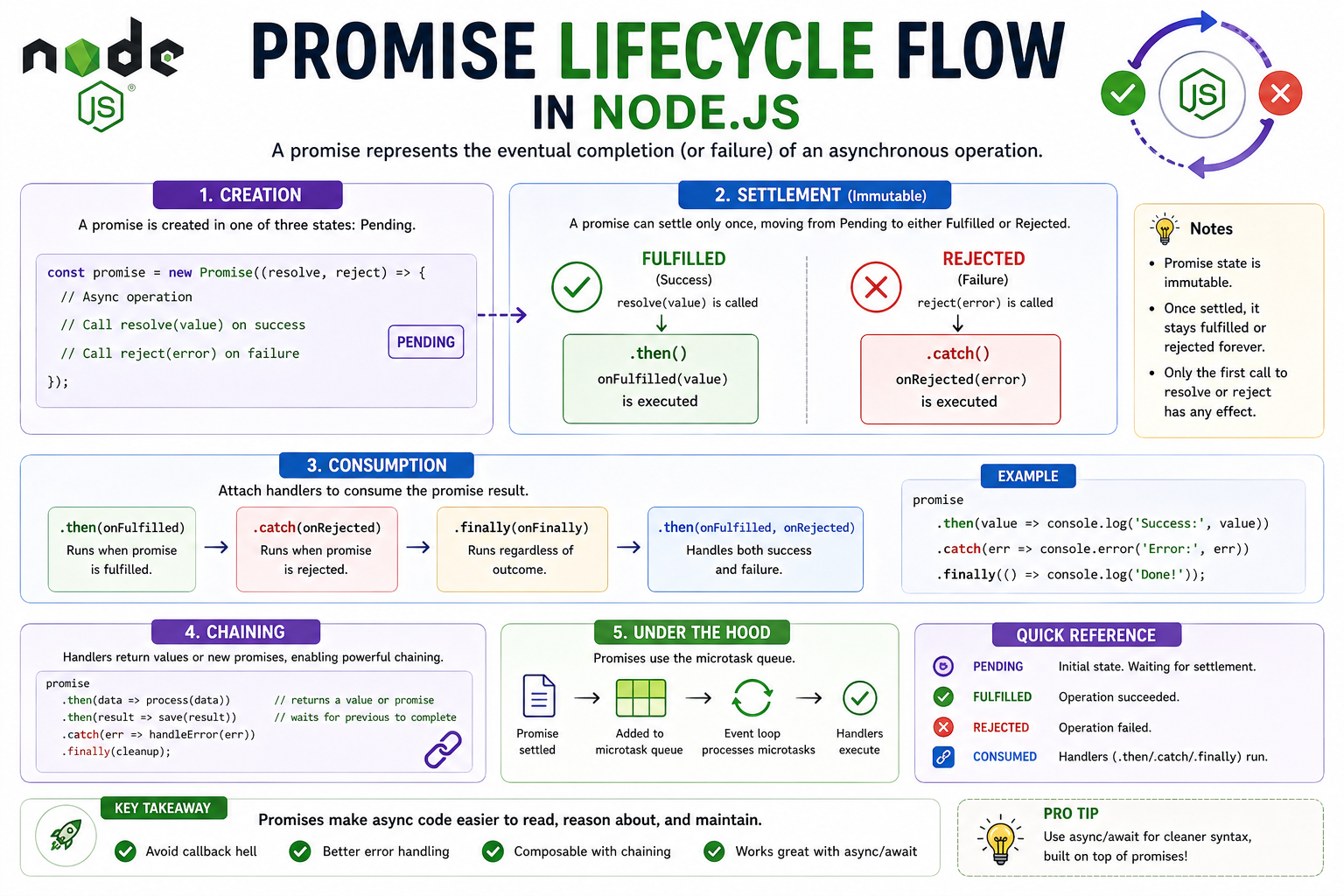
What A Promise Felt Like To Me
This helped me.
A promise is basically:
A future result.
Something not ready yet…
but expected later.
That idea made the name make sense.
Why Promises Felt Better
Main reason?
Readability.
Honestly.
That was it.
Compare nested callbacks…
versus chain.
I’d rather debug promise code any day.
Especially at night 😄
Error Handling Felt Better Too
With callbacks:
Errors often handled everywhere.
With promises:
.catch(error=>{

 console.log(error);

});
Single place.
Cleaner.
That felt nice.
Callback vs Promise
This is how I remember it.
Callbacks:
Do this later.
Can get nested.
Messy sometimes.
Promises:
Represent future value.
Chain steps.
Cleaner flow.
That comparison helped me.
Real File Example With Promise Style
Modern Node gives promise-based ways too.
const fs = require("fs/promises");

async function readFile(){

 try{

 const data=
 await fs.readFile(
 "data.txt",
 "utf8"
 );

 console.log(data);

 }

 catch(error){

 console.log(error);

 }

}
When I first saw file handling like this…
it felt much nicer.
Though that moves toward async/await.
But it helped show evolution.
Small Practice Example
Callback:
setTimeout(

function(){

 console.log(
 "Finished"
 );

},

1000

);
Now promise:
new Promise(

resolve=>{

 setTimeout(

 ()=>resolve(
  "Finished"
 ),

 1000

 );

}

)

.then(console.log);
Same idea.
Different style.
Good exercise.
One Mistake I Made
I thought promises replace callbacks completely.
Not really.
Promises are built on solving problems callbacks exposed.
But callbacks still exist.
Important distinction.
Another Thing I Misunderstood
I thought async means “runs in random order.”
Wrong.
There is order.
Just different flow.
That misunderstanding caused me confusion early.
What Finally Made It Click
I stopped thinking:
Async code is weird delayed code.
And started thinking:
Async code is just code designed for waiting.
That changed everything.
That was the real idea.
Quick Recap
Why async exists:
Some work takes time
Node shouldn’t block waiting
Callbacks handle “run later” logic
Promises improve readability
Promises help manage async flow better
That’s the foundation.
Conclusion
Async code confused me a lot at first.
Mostly because I was reading it as if everything happened top to bottom immediately.
But once I understood waiting…
it made much more sense.
Callbacks introduced the idea.
Promises made it cleaner.
And honestly…
that progression felt natural.
If you remember one thing from this article, remember this:
Async code exists because waiting should not stop everything else.
That one idea explains a lot.
If you like this simple learning-style explanation,
I write more notes at
devwithsahil.hashnode.dev
and share progress on LinkedIn 🙂


