Setting Up Your First Node.js Application Step-by-Step
I still remember setting up Node.js for the first time.
I thought it would be complicated.
Like one of those setups where you spend two hours fixing environment issues before writing a single line of code.
But honestly…
it was much simpler than I expected.
And the first time I saw JavaScript run outside the browser…
that felt pretty exciting.
Because until then, JavaScript meant browser for me.
Buttons.
Console.
DOM stuff.
Then suddenly…
I was running JavaScript from a terminal.
That felt different.
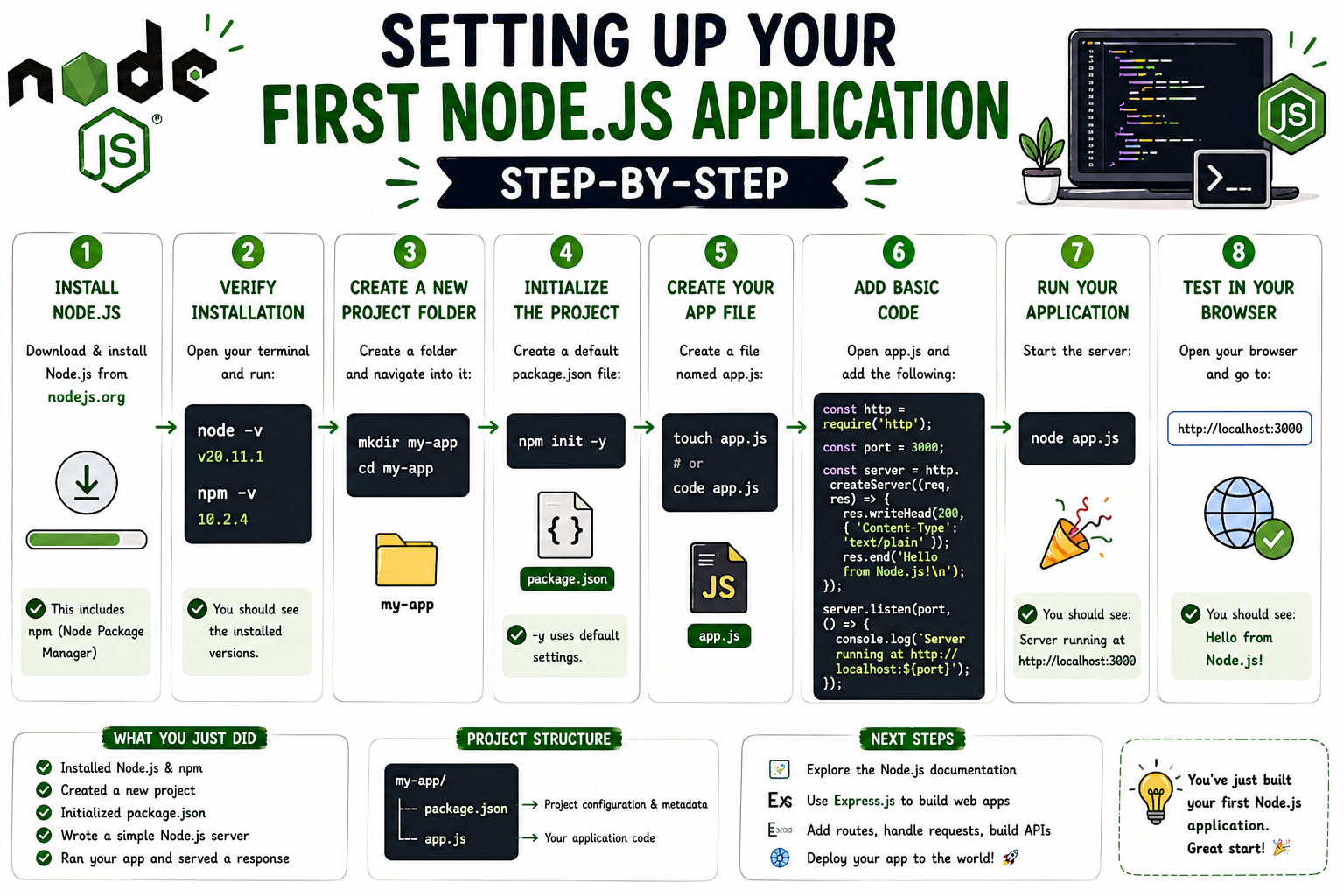
First Step — Install Node.js
Before writing anything, you need Node installed.
Go to the official Node.js website and install it the way you’d install any normal software.
Nothing unusual.
Next.
Next.
Finish.
That’s basically how my first install went.
And I remember overthinking it much more than necessary.
Check If It Installed Properly
This was the first command I ran.
node -v
If Node is installed, you should see a version number.
Something like:
v22.x.x
That moment was satisfying.
Because it felt like:
Okay…
it works.
Also Check npm
I didn’t know this mattered initially.
But Node usually comes with npm too.
Check it:
npm -v
Version shows up?
Good.
You’re set.
My First “Wait… JavaScript Runs Here?” Moment
Then I tried:
node
And entered something like:
2 + 2
Output:
4
And I remember smiling a little.
Because…
that was JavaScript running in terminal.
Not browser.
That was my first real Node moment.
What Is REPL?
This confused me at first.
People kept saying:
Use the Node REPL.
I thought it was some tool I needed to install.
It isn’t.
REPL stands for:
Read
Evaluate
Loop
Big name.
Simple idea.
It reads what you type.
Runs it.
Shows result.
Repeats.
That’s all.
Interactive JavaScript shell.
Things I Tested In REPL
I played with tiny stuff.
"hello".toUpperCase()
5 * 10
const name = "Sahil"
Very simple.
But it helped me get comfortable.
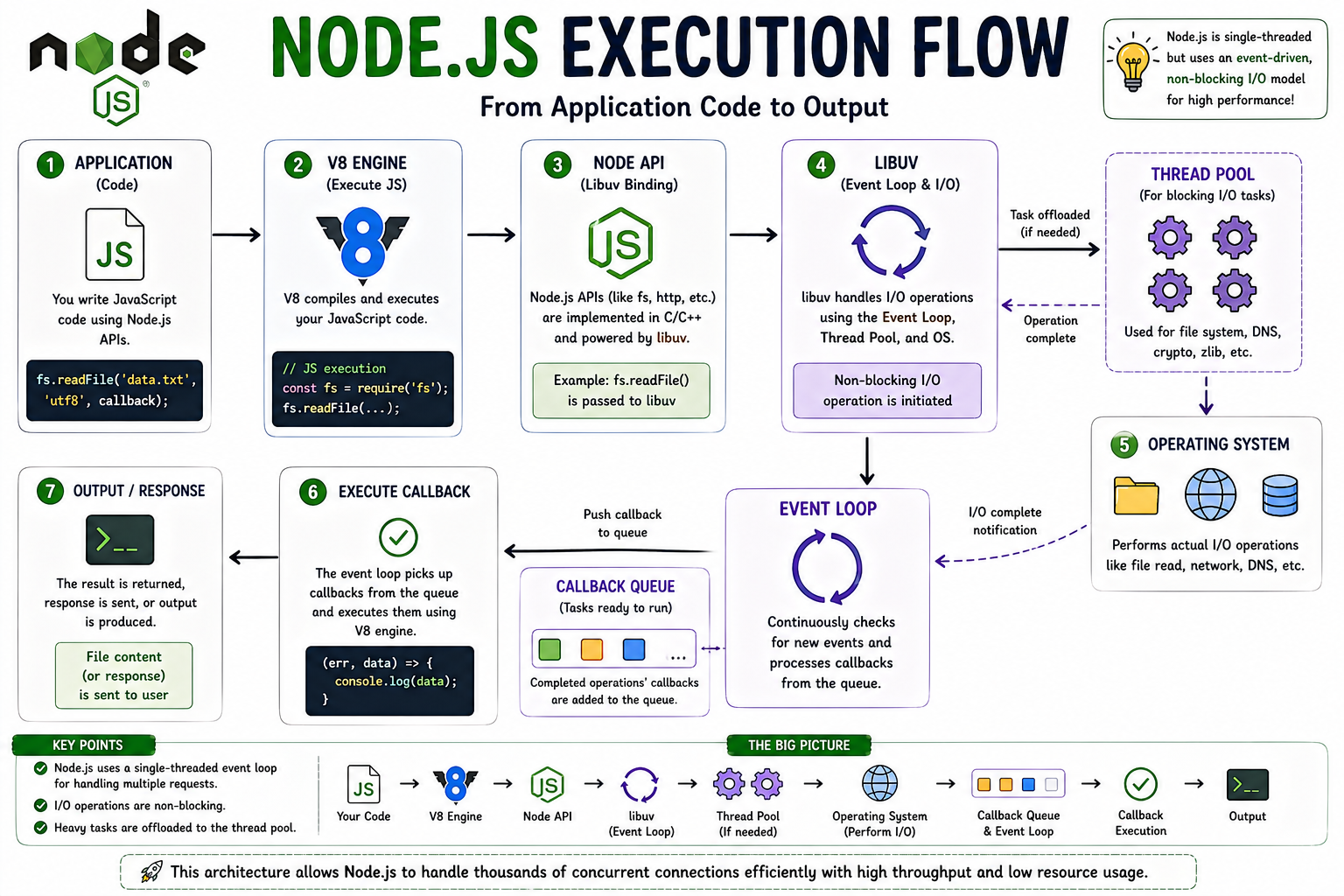
Node Execution Flow
Then I Created My First JavaScript File
This felt more real.
Create a file:
app.js
Inside:
console.log(
"Hello Node"
);
Save it.
That’s your first Node script.
Very small.
But still your first application.
Running It Felt Cool
In terminal:
node app.js
Output:
Hello Node
And honestly…
seeing that for the first time felt more exciting than it probably should have 😄
Because it was proof:
JavaScript was running outside the browser.
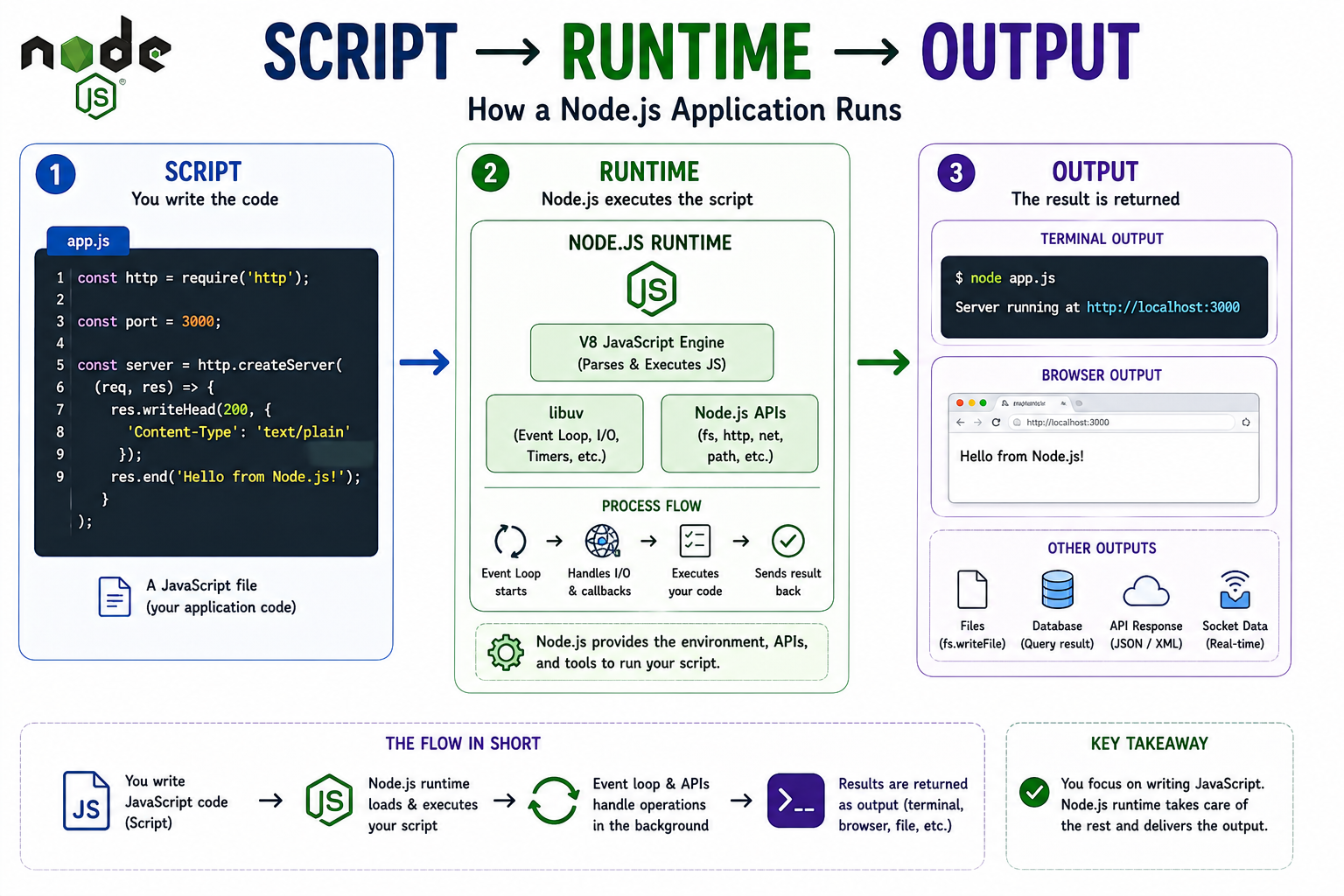
Script → Runtime → Output Flow
That’s When It Started Clicking
I realized:
Browser runs JavaScript in browser runtime.
Node runs JavaScript in Node runtime.
Same language.
Different environment.
That idea started becoming real.
Trying A Small Script
Then I played with something slightly bigger.
const name = "Sahil";

console.log(
"Hello " + name
);
Run:
node app.js
Output:
Hello Sahil
Still simple.
But it made the process feel natural.
Edit.
Run.
See output.
Repeat.
Then I Tried Input From Terminal
This blew my mind a little.
console.log(
process.argv
);
Run:
node app.js hello
You’ll see arguments.
That made me realize:
Node can interact with command line too.
Very interesting.
Hello World Server Was The Big Moment
This is where it finally felt like backend.
Create:
const http = require("http");

const server = http.createServer(

(req,res)=>{

 res.end(
  "Hello World"
 );

}

);

server.listen(3000);
Run:
node app.js
Then open:
http://localhost:3000
And seeing:
Hello World
appear in browser…
that was a genuine wow moment for me.
Because now JavaScript was serving a page.
That felt very different from normal scripts.
What I Got Wrong Initially
I thought:
Running Node script means opening it in browser.
Wrong.
You run it from terminal:
node filename.js
Simple.
But I genuinely mixed that up once.
Another Thing I Didn’t Understand
I thought REPL and .js files were the same thing.
Not exactly.
REPL is quick interactive testing.
Files are actual scripts.
Different use cases.
That took me a little time.
Small Practice I’d Suggest
Try these three.
First:
console.log(
5 + 10
);
Run it.
Then:
const city="Bangalore";

console.log(city);
Run it.
Then build the Hello World server.
Those three steps teach a lot.
Why Starting This Small Helped
I used to feel pressure to jump into big frameworks.
Express.
APIs.
Databases.
Everything.
But honestly…
starting with plain Node helped more.
Because I understood the runtime first.
And that mattered later.
What Finally Made It Click
I stopped thinking:
I’m installing some complicated backend technology.
And started thinking:
I’m just giving JavaScript another place to run.
That made Node feel much less intimidating.
Quick Recap
What you do first:
Install Node
Verify with
node -vTry the REPL
Create
app.jsRun with
node app.jsBuild simple Hello World server
That’s enough to get started.
Really.
Conclusion
Setting up Node felt much bigger in my head than it actually was.
In reality…
it was:
Install.
Test.
Run a file.
Build a tiny server.
That’s it.
And honestly…
that first Hello World server is one of those small milestones that feels memorable.
If you remember one thing from this article, remember this:
Node starts getting real the moment you run your first script from the terminal.
That’s where it clicked for me.
If you like this simple learning-style explanation,
I write more notes at
devwithsahil.hashnode.dev
and share progress on LinkedIn 🙂


